THE PROBLEM: I had been hearing about, but had yet to experience a rather nasty bug in Navisworks 2012 that prevents you from updating models created from DWF files… until yesterday. (Note: if you’re familiar with the bug you can skip to THE FIX below.)
This is the error you will receive when trying to refresh a NWF created from DWF or DWFx files that has changes.
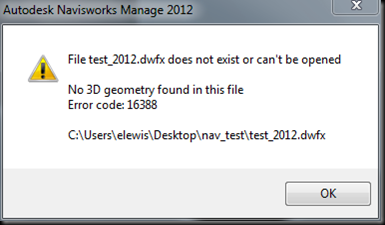
Funny thing is, if you open the offending DWF with Design Review, there is most definitely 3D geometry. What gives? Well, here is the
official line from Autodesk:
Thanks for your participating in our community. This is a known issue for Navisworks 2012. We have reported this to our development team, and try to fix it.
For now, as Andy said, you can append the file rather than overwriting and replacing the old one. (emphasis mine.)
Really? That’s the fix? Append (or re-import) the file? Each time? Wow! That means that any selection sets or other work I have attached to the geometry will have to be redone. I would rather they just say; “DWF files are not supported for Navisworks at this time.”
I hadn’t experienced this particular bug even though I have been using 2012 for more than 6 months. Why now? That got me thinking, and sure enough, the NWF file I had been working in was compiled in 2011 and upgraded later to 2012. Could that be the solution? Hmmmmm…..
THE FIX: Compile the NWF from DWFs using 2011 (if its available to you.) Once you do that, just open in 2012 and save. It works as expected after that. One caveat though. You won’t be able to add
new DWFs to the NWF without experiencing the same difficulties. Once you upgrade to 2012, you can’t open the fileset with 2011 anymore, and appending the DWF using 2012 creates the same problem. The same error is thrown if you save the file back to the previous version of Navisworks. Hopefully, with good planning, you can use this imperfect workaround to continue to use DWF files in your workflow.
FURTHER INVESTIGATION: I have a feeling the error is related to how 2012 creates the NWC (Navisworks Cache.)

The DWF file is the original file used to start the NWF using Navisworks 2011. Notice that the bottom three files in the list have the same file
name and only the extension is the different. This is normal behavior for 2011 and previous releases.
The file at the top is the NWC created when you
UPGRADE the NWF to 2012. A hashmark (#) is added. Then it gets weird on the second file down. That is the one that is created when you compile NWFs from DWFs using 2012. I have no idea what all the extra characters are. Hopefully this will be fixed by next release.
Our workflow is tied pretty closely to DWF exports. I find them easier to filter information from and easier to orient myself when navigating the model (we export
by discipline, by floor.) I also prefer the visual quality of the DWF exports over NWCs created with the
Navisworks Export Utility for Revit.
I’d really like to hear from my readers on this. What format do you use to compile your NWFs? How do you structure them? Why? Do you use the Revit Export utility? Why? Do you break your model files up by floor? By discipline? Both?
The
Big Bad BIM isn’t afraid of
Big Bad BUGS.


